
GameGlass starts with the smallest possible question: can a game engine read a piece of real hardware? Not a polished demo, not a protocol spec — just one knob, one number, one line on screen that moves when you turn it.
That's stage 0. Here's what it took.
The hardware
Nothing exotic: an ESP32 dev board, a breadboard, and a 10kΩ potentiometer. Three wires — the pot's outer legs to 3.3V and GND, the middle leg (the wiper) to an ADC-capable GPIO pin.
The board reads the pin, averages a handful of samples to cancel out the ESP32 ADC's natural jitter, and prints the result over USB serial as plain JSON:
{"pot":1711}20 times a second. That's the entire device-side contract for stage 0 — no protocol design yet, just a number going out.
Why not a Godot serial plugin?
Godot doesn't ship with serial port support, and the third-party GDExtensions that add it are mostly thin, unmaintained, single-maintainer repos — not something to build a tool on top of.
Godot does have solid native UDP support. So stage 0's bridge is a small Python script that opens the serial port, reads each JSON line, and forwards it as a UDP packet to a port Godot is listening on. Godot's side is a few lines of GDScript with zero dependencies:
ESP32 (serial) → Python bridge → UDP → GodotIt's not a hack — it's the simplest version of the bridge architecture GameGlass needs anyway. Later stages add a broker layer (MQTT) for multi-device setups; this is that idea in miniature, proven with one device first.
What it looks like working
Knob value printing in a terminal on one side, the same number live in a Godot Label on the other, moving in lockstep as the pot turns.
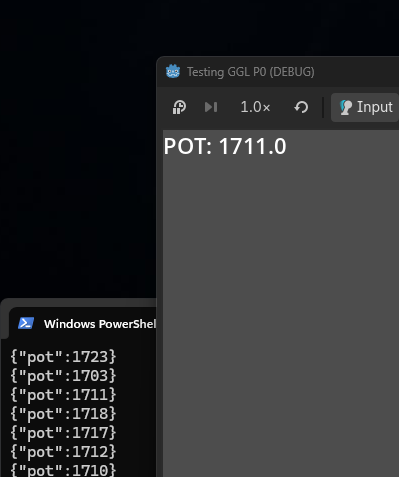
{"pot":1711} becomes POT: 1711.0.That loop — physical input, real engine, no manual bridging code beyond what's shown above — is the whole point. Everything GameGlass does later is this same shape, just with more devices and richer data.
Up next: stage 1
Swap the Godot Label for the 16×2 LCD — same data, but now it's driving a physical display instead of a UI element. That's the first real "debug screen" use case, which is the broadest audience this project is aimed at.
More as it happens.